
- Home
- Statistics and Analytics
- How Many Spam Complaints Are T ...




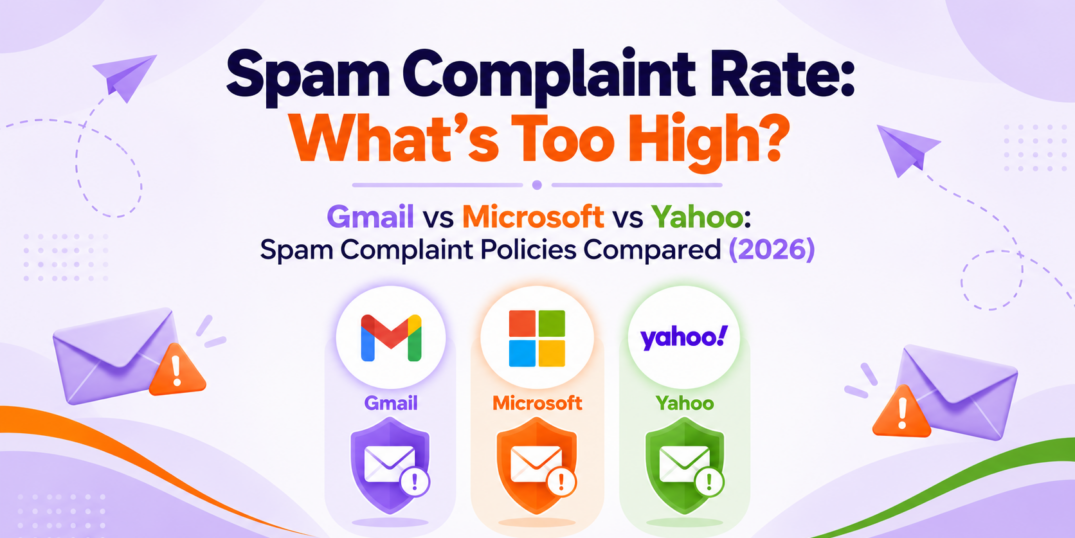
On a 10,000-email send, just 30 spam complaints equal 0.3% – a level Gmail says senders should avoid ever reaching.
Thirty.
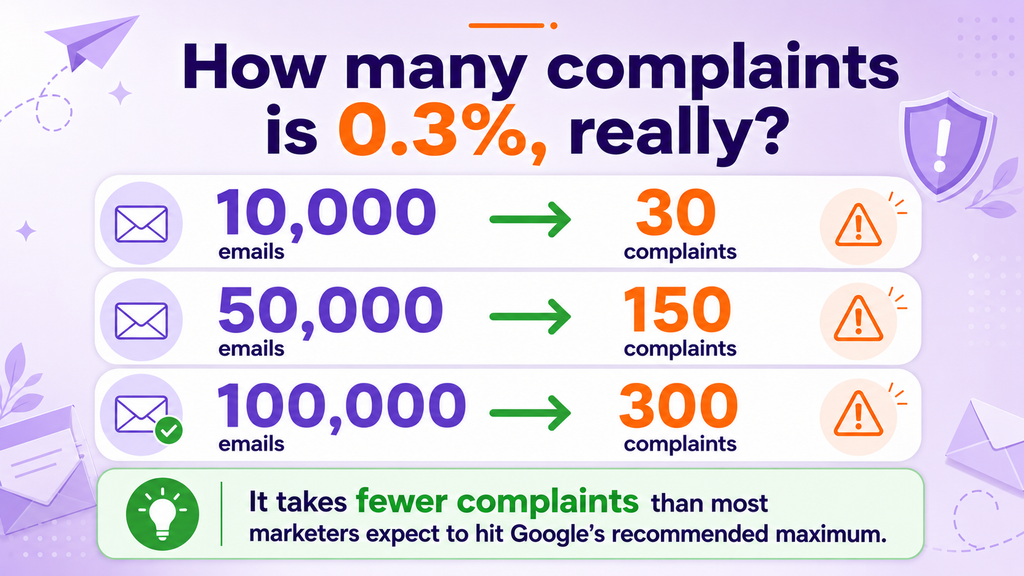
That is how many spam complaints it takes to reach a complaint rate of 0.3% on 10,000 delivered emails.
It does not sound like much. In fact, if 9,970 people did not complain, you might be tempted to call the campaign a success and move on.
Mailbox providers may see it differently.
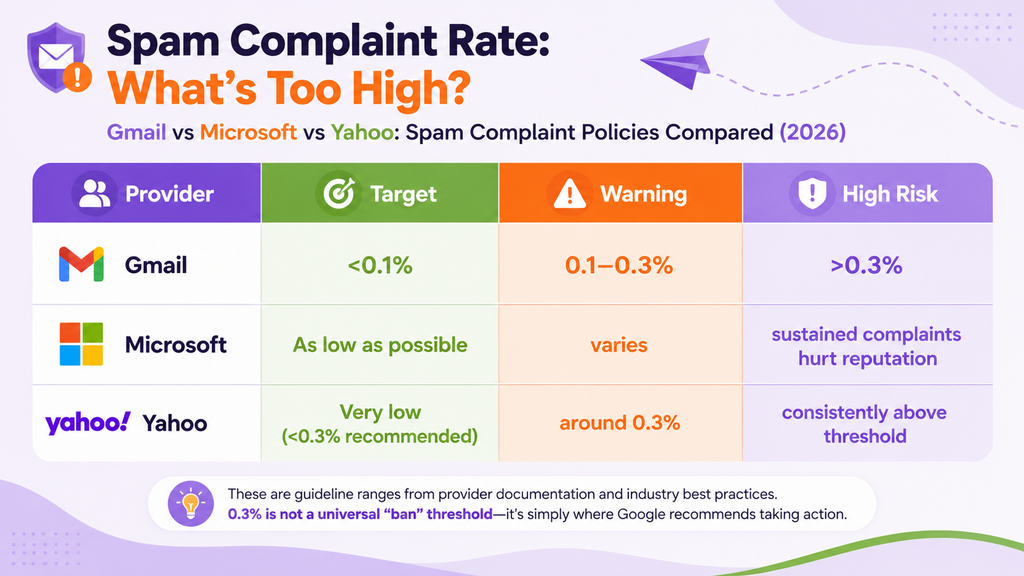
Google recommends keeping the user-reported spam rate below 0.1% and preventing it from ever reaching 0.3% or higher. Yahoo also tells senders to keep their spam rate below 0.3%.
That makes 0.3% an upper limit, not a comfortable target.
And the trouble usually does not begin with an obviously terrible email. More often, it begins with a list you have not cleaned in a year, a subscriber who no longer remembers signing up, or one extra automation quietly turning one weekly email into four.
None of that feels like spam from the sender’s side.
It can feel very different from the subscriber’s side.
What is a spam complaint rate?
A spam complaint happens when a recipient uses the Report spam or Junk button in their mailbox.
The complaint rate is the percentage of delivered messages that recipients report as spam. In a simplified example:
- 10 complaints from 10,000 delivered emails = 0.1%
- 30 complaints from 10,000 delivered emails = 0.3%
- 150 complaints from 50,000 delivered emails = 0.3%
- 300 complaints from 100,000 delivered emails = 0.3%
The numbers look small because the percentages are small. Their effect may not be.
One detail matters here: mailbox providers calculate complaint rates using their own data and traffic. Your total list size is not necessarily the denominator they use. Yahoo, for example, says its rate is based on messages delivered to the inbox. Your email platform and each provider’s reporting dashboard may therefore show different figures.
Use the examples above to understand the scale, not as a substitute for provider-level monitoring.
Is a 0.3% spam complaint rate acceptable?
Not really.
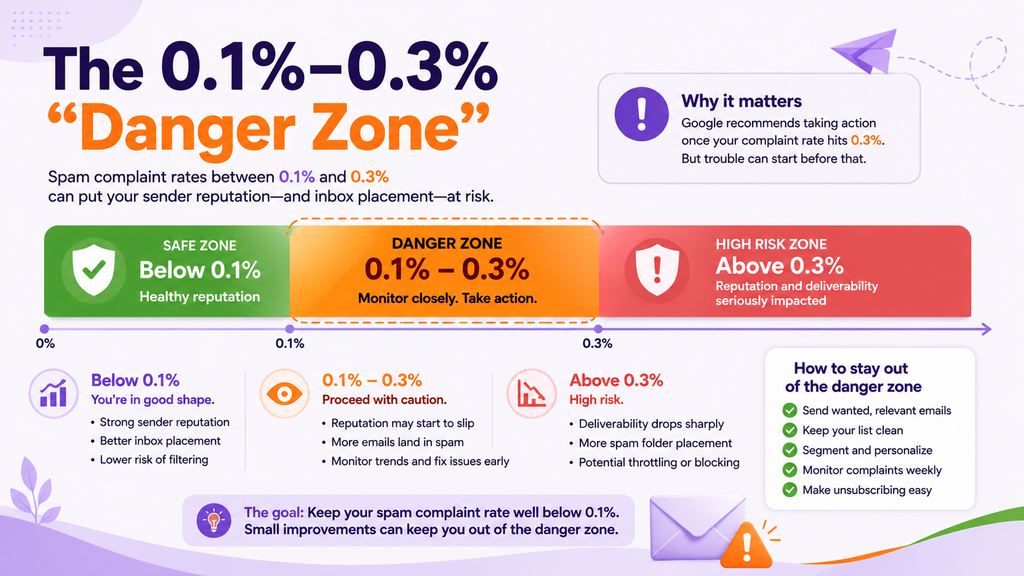
It is better to think of complaint rates as three zones:
Below 0.1%: the safer zone
This is where Google recommends senders stay. It suggests that the audience generally recognizes and wants the messages it receives.
Between 0.1% and 0.3%: the danger zone
You may still be below the maximum, but that does not mean everything is healthy. Rising complaints can signal problems with consent, targeting, frequency, or expectations.
This is the time to investigate—not the time to wait for the number to become officially alarming.
At 0.3% or higher: the high-risk zone
Google tells senders to prevent their spam rate from ever reaching this level. Rates at or above 0.3% can have a stronger negative effect on inbox delivery, and senders above that threshold may not qualify for delivery support or mitigation.
In other words, 0.3% is not a finish line. It is the edge of the cliff.
Do Gmail, Yahoo, and Microsoft use the same complaint threshold?
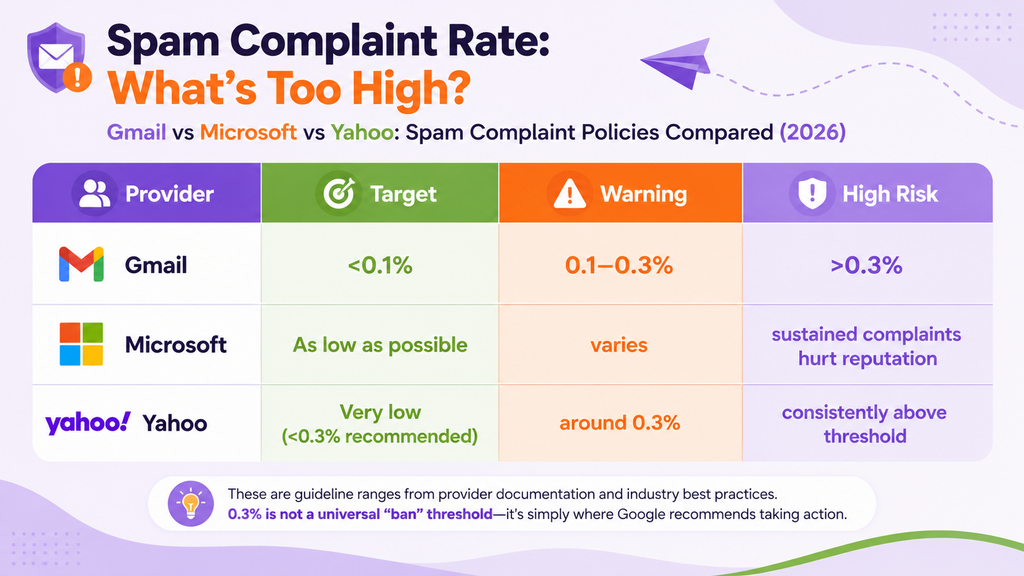
No. Each mailbox provider evaluates mail using its own systems.
Gmail
Google says senders should keep the user-reported spam rate in Postmaster Tools below 0.1% and avoid ever reaching 0.3% or higher.
These guidelines apply to mail sent to personal Gmail accounts. If you send more than 5,000 messages per day to Gmail accounts, you must also follow Google’s bulk-sender requirements, including authentication and easy unsubscribe.
Yahoo
Yahoo requires senders to keep their spam rate below 0.3%. Its calculation is based on messages delivered to the inbox, which may explain why Yahoo’s figure differs from the complaint rate shown inside an email marketing platform.
Microsoft
Microsoft does not publish a matching universal percentage threshold for external senders. It evaluates bulk mail using several signals, including its Bulk Complaint Level, past interactions, sending frequency, and user or administrator feedback.
The practical lesson is simple: keep complaints as low as possible and monitor performance separately by provider. A healthy overall average can hide a problem concentrated at Gmail, Yahoo, or Outlook.
Why do subscribers mark legitimate emails as spam?
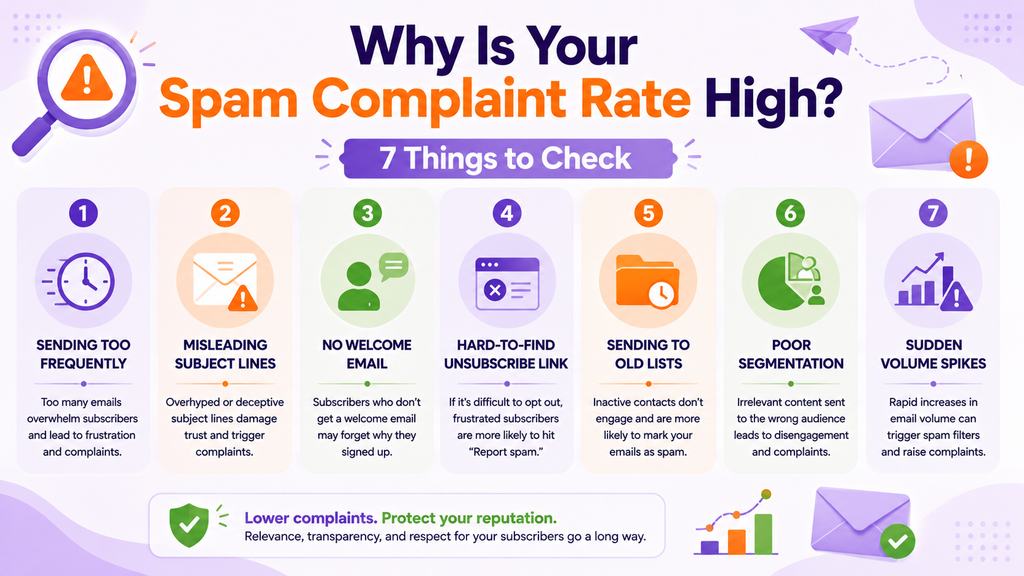
Most spam complaints are not caused by dramatic mistakes. They are caused by small mismatches between what the sender thinks is reasonable and what the subscriber expected.
Here are seven common causes.
1. You are sending too frequently
A person may have happily agreed to one weekly update. Then you add a promotional campaign, a product automation, and a “quick reminder.” Suddenly, your friendly weekly email has brought three roommates.
Review campaigns and automations together. Subscribers experience the combined frequency, even if each workflow looks reasonable on its own.
2. The subject line overpromises
A subject line can be clever without becoming misleading. If it suggests an urgent account problem but opens into a sale, some readers will feel tricked.
Make sure the subject line accurately represents the email. Curiosity can earn an open; disappointed expectations can earn a complaint.
3. Subscribers do not remember joining your list
This often happens when too much time passes between signup and the first email.
Send a welcome message promptly. Remind people who you are, why they are receiving the email, and what kind of content they can expect.
4. The unsubscribe link is difficult to find
If leaving politely requires a magnifying glass and three clicks, the spam button becomes the easier option.
Keep the unsubscribe link visible and make the process simple. Losing one uninterested subscriber is much safer than collecting a spam complaint from them.
5. You are sending to an old list
Consent has a memory problem.
People change jobs, abandon email addresses, forget purchases, and lose interest. A list that was healthy two years ago is not automatically healthy today.
Remove invalid contacts, review long-term inactivity, and consider a careful re-engagement campaign before continuing to mail people who have stopped responding.
6. Everyone receives the same message
An email can be useful and still be irrelevant to most of the list.
Segment subscribers by their interests, purchases, location, or recent engagement. Relevance reduces the feeling that your email arrived simply because an address existed in a database.
7. Your sending volume suddenly spikes
A sharp jump in volume can look suspicious to mailbox providers, especially when it includes older or less engaged contacts.
Increase volume gradually, keep your sending pattern reasonably consistent, and avoid emailing the entire forgotten corner of your database in one heroic afternoon.
How can you lower your spam complaint rate?
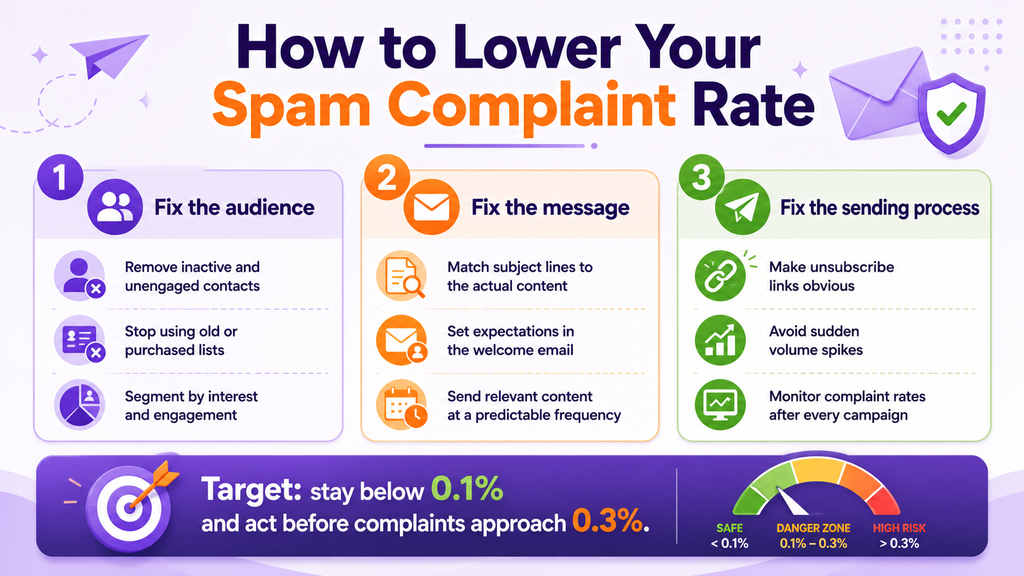
The solution is not finding a more impressive synonym for “Sale.” It is improving the audience, the message, and the sending process.
Fix the audience
- Remove invalid and persistently inactive contacts.
- Never use purchased, rented, or scraped lists.
- Segment subscribers by interest and engagement.
- Confirm that your signup process clearly explains what people are joining.
Fix the message
- Match the subject line to the actual content.
- Set expectations in the welcome email.
- Send content that is useful to that particular audience.
- Use a predictable identity, tone, and frequency.
- Avoid making every email a promotion.
Fix the sending process
- Make the unsubscribe link obvious.
- Honor unsubscribe requests quickly.
- Check whether campaigns and automations overlap.
- Avoid sudden increases in sending volume.
- Monitor complaint rates after every campaign and by mailbox provider where possible.
What should you do when complaints start increasing?
Do not wait for the rate to reach 0.3%.
Pause and investigate:
- Identify the affected campaign, audience, and provider. Was the increase concentrated in one segment or mailbox provider?
- Check the source of the contacts. Were they active subscribers with clear consent?
- Review the promise. Did the subject line, offer, and sending frequency match what subscribers expected?
- Check overlapping sends. Could the same people have received several campaigns or automations close together?
- Suppress complainers immediately. Do not send marketing messages to them again.
- Reduce risk before the next send. Start with your most recent and engaged subscribers while you correct the underlying problem.
Changing the subject line alone will not repair a consent or list-quality problem. A new sending IP will not turn an unwanted email into a wanted one, either.
Complaints are small numbers with a large message
Spam complaints are not merely lost subscribers. They are feedback sent directly to the mailbox providers deciding where your future emails belong.
The safest approach is not to hover just below 0.3%. It is to stay comfortably below 0.1% by sending wanted email to people who recognize you, making it easy to leave, and noticing changes before they become reputation problems.
Thirty complaints may look tiny next to 10,000 recipients.
To a mailbox provider, they can be loud enough.




 Your Privacy Choices
