Home
Help Center
Email Marketing Service
Onboarding progress
Claiming your onboarding reward and using the coupon code
Understanding domain statuses: Verified, Processing, Unverified
Managing sending domains
Why DNS records matter for email deliverability
Adding & verifying DNS records (SPF, DKIM, DMARC)
Understanding Your Domain Health
Checking & resolving domain blacklist issues
Managing sender email addresses
Sender address requirements and best practices
What to do if a sender address is in use by active campaigns
Understanding shared vs. dedicated IP addresses
Increasing sending limits with multiple domains
Connecting or disconnecting a domain to/from an IP address
Buying & managing dedicated IP addresses
User roles & statuses
User status explained: active and deleted users
How to add a new user: user invitations and registration
Managing user permissions and access rights
Default permissions for additional users
Deleting users
Transferring admin rights to another user
What happens after admin rights are transferred?
What happens when permissions are disabled for a user?
How to create a contact
How to work with contact list
Technical Requirements for Your Contact List Fields
Adjusting contact list settings
How to Create a Contact Group
How to Work with a Contact Group
How to Create a Segment
How to work with a segment
Creating & managing groups
Managing contact attributes
Adding and managing custom fields
Adding and managing tags
How to create your first email campaign
Campaign card overview: General, Contacts, Email template, Scheduler
Naming and renaming campaigns
Understanding campaign statuses: Waiting, In progress, Paused, Finished
Saving progress and navigating between campaign blocks
How to set up the sender email address and name
Managing reply-to addresses in campaigns
Selecting and managing IP addresses for sending
How to select recipients: Contacts, Groups, Segments
Excluding contacts and groups from a campaign
Understanding contact limits and subscription packages
What to do if you exceed your email sending limit
Validating contacts before sending: Email Checker explained
Choosing and editing email templates for campaigns
Uploading custom HTML
Writing effective subjects and preheaders
Personalizing Your Subject Lines and Preheaders
Adding and managing UTM parameters
Scheduling campaigns: send now or later
Setting up delivery dates, times, and days of the week
How to calculate and adjust sending volume over time
Managing dedicated IP expiration and renewal
Understanding autowarmup in Sendigram
How to preview and test your campaign
Managing and editing your test email group
Using the campaign calendar: viewing, filtering, and creating campaigns
Understanding campaign statuses: Active, Scheduled, Completed
Viewing campaign details and quick actions from the calendar
Navigating the campaign list: columns and filters
Searching and filtering campaigns by name, date, and status
Campaign card: overview, timeline, and audience
How to pause, continue, or delete a campaign
Understanding campaign statuses: Planned, Active, Paused, Finished
Campaign performance & analytics
Using heatmaps to analyze email engagement
Claiming your onboarding reward and using the coupon code
To celebrate completing onboarding, Sendigram offers new users a special reward. This comes in the form of a coupon code that you can use toward your subscription or email credits.
1. When You Receive the Reward
- After you finish all onboarding steps, a reward notification appears on your Dashboard.
- You’ll also receive an email with your coupon code for safekeeping.
2. How to Apply the Coupon Code
- Go to Plans & Pricing.
- Start purchasing any paid option.
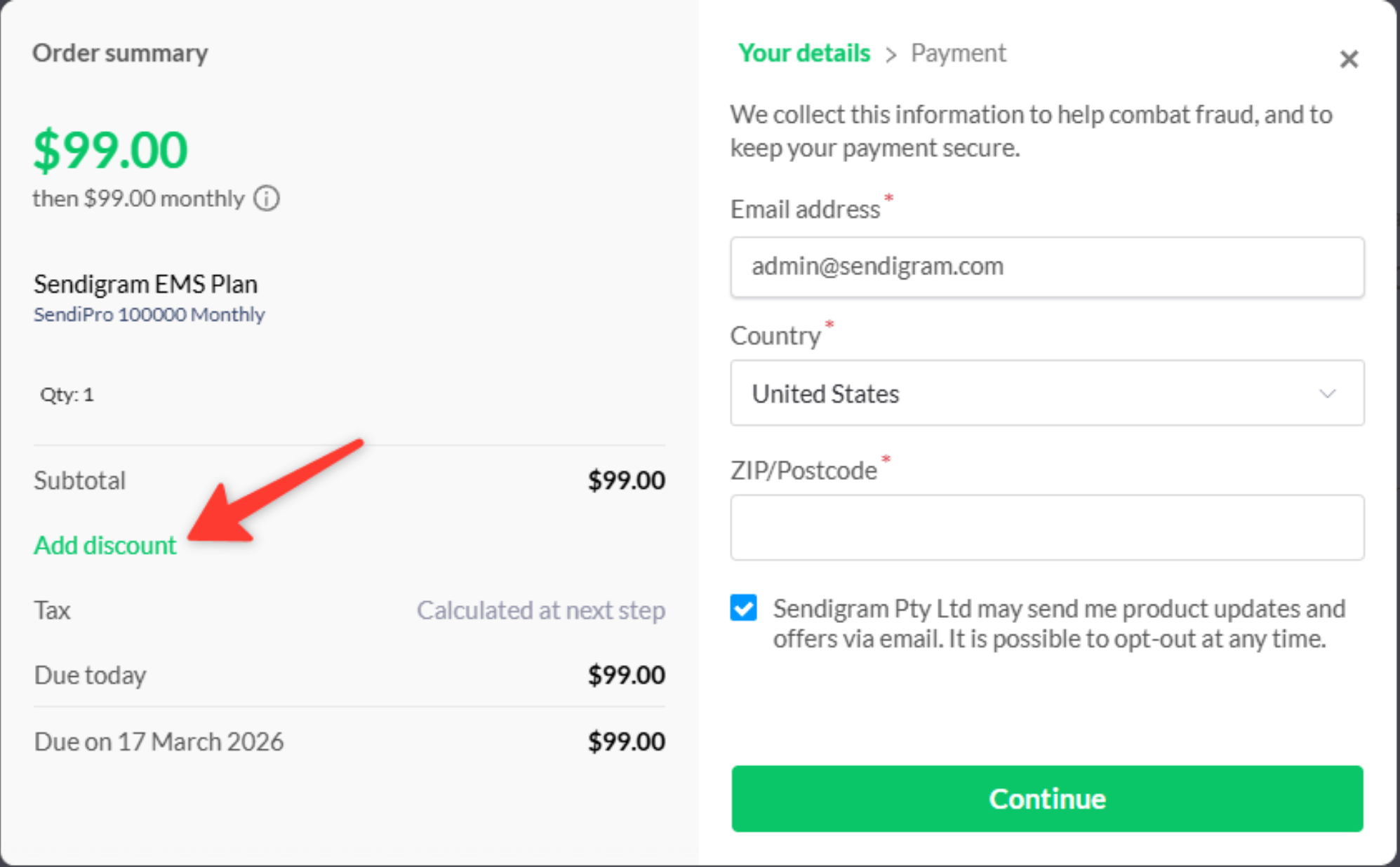
- In the opened popup window you’ll see the Add discount field – just paste your code into it.
- Confirm — the discount will apply to your next invoice or purchase of email credits.
3. Rules and Conditions
- Coupon codes are usually one-time use.
- They may apply to:
- Your first paid subscription.
- Additional email credits.
- Each coupon has an expiry date — check the details in your Dashboard or email notification.
4. Tips for Maximizing Your Reward
- Apply the coupon before upgrading to a higher-tier plan.
- Use it when you’re ready to send larger campaigns, so you get maximum value.
- Keep the code safe — it cannot be restored once it expires.
5. Troubleshooting
- If your coupon doesn’t work, double-check the expiry date and correct spelling of the code.
- If problems persist, contact Sendigram Support
Still have questions?
Book a personalized live demo
See how Sendigram fits your email marketing workflow in a live session tailored to your business.